@toolbox-web/grid v2 is here
@toolbox-web/grid 2.0.0 went out the door on April 16, 2026 — three months to the day after v1.0. And honestly, this is the release the library has been quietly aiming at the whole time.
v1 was about shipping something that worked. v2 is about pulling the loose threads into a single, coherent shape: one way to fetch data, one accessibility story, one consistent plugin API across Angular, React and Vue. A lot of the sharp edges are gone. The API surface is smaller than it's ever been. The docs are better. And after spending the last few months benchmarking against the grids I used to pay for, I'm quietly pretty proud of where this one has landed.
If you're already on v1, skip ahead to Upgrading — the breaking changes are small and well-contained. If you've never looked at the library before, this is the moment to start.

The short version
- Unified DataSource architecture. One event-driven data flow shared by
ServerSide,Tree,GroupingRowsandMasterDetail. - Accessibility taken properly seriously. Full ARIA grid pattern, live announcements, axe-core in the E2E suite, and an
A11yConfigobject for i18n. - ~106 deprecated APIs removed. Everything that was deprecated across the v1 line is gone. The surface is clean again.
- Styled Excel export. The export plugin now writes formatted spreadsheets — header styles, per-column number formats, conditional cell styles, column widths — not just data dumps.
- Framework adapters hit 1.0.
@toolbox-web/grid-angular,-reactand-vueall released 1.0 alongside the core. - Faster than AG Grid Community, at a third the bundle size. Side-by-side benchmark lives at toolboxjs.com/grid/comparison. Run it yourself.
Read on for the parts worth the detail.
The headline: unified DataSource
This is the change that shapes most of v2, and it was also the one that forced the most breaking changes. So first, a quick disclaimer: if you're happy handing the grid a plain array of rows, nothing about that changes. rows = [...] still works, still pages you through however many rows your browser is willing to hold, and is still the right answer for most small and medium data sets.
What v2 reworks is the other axis — the async one. The story for fetching data on the fly: paginated endpoints, load-on-scroll for datasets the browser can't (or shouldn't) keep in memory all at once, and loading children on demand for hierarchical and grouped structures.
The problem
In v1, any plugin that needed to load data asynchronously did it its own way. ServerSide had dataSource callbacks that paginated the root level. Tree had a separate TreeDataSource type with its own params and result shapes for loading children. GroupingRows had async groups() and rows() callbacks. MasterDetail didn't have the option of async loading at all, this relied on all data being available in the rows array up front.
Four plugins, four patterns, four sets of types — and none of them composed. If your application needed server-side tree data inside grouped rows, you were on your own. That's the kind of thing you accept while you're getting something off the ground, and then one day you look at it and realise it's the one part of the library you're tired of explaining.
The fix
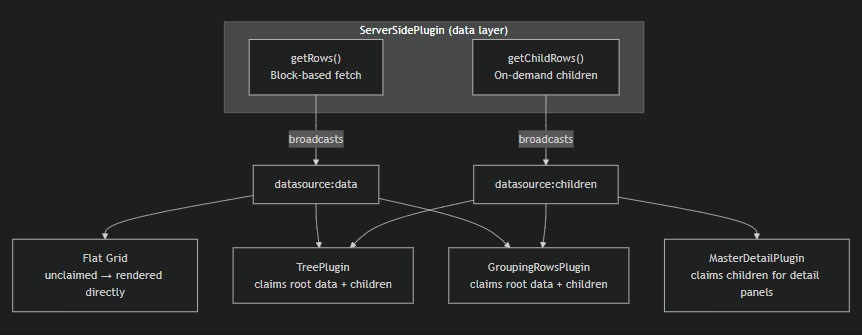
v2 gives ServerSide two well-defined responsibilities — and only those two — that turn out to cover every other plugin's async needs:
- Load a window of top-level rows. Give it a
getRows({ startNode, endNode, sortModel, filterModel })callback and it paginates the root level for you. This is classic infinite scroll: as the user scrolls, the grid asks for the next window and stitches it into the virtual viewport. - Load the children of a node on demand. Give it a
getChildren(parent)callback and it streams children in when something expands. This is the new piece. It's why a single plugin can now feed Tree, GroupingRows and MasterDetail — they all expand something, and a child-loader is the right shape for all three.
Everything downstream is just an event bus. Once ServerSide has fetched something, it broadcasts it:
datasource:data— a window of top-level rows arrived (DataSourceDataDetail)datasource:children— children for an expanded node arriveddatasource:loading/datasource:error— fetch state changesdatasource:viewport-mapping— virtual scroll coordination
Structural plugins — Tree, GroupingRows, MasterDetail — no longer own any fetching logic. They subscribe to these events and fold the incoming rows into their own model. For the edge cases where a plugin needs to ask instead of just listen, there are two queries: datasource:fetch-children to kick off a child load, and datasource:is-active to check whether ServerSide is actually the current data source.
The end result is something you couldn't do cleanly in v1: hierarchical or grouped data that's also server-paginated, with one loader definition. Turn on ServerSide, point getRows at your page endpoint and getChildren at your expand endpoint, then enable whichever structural plugin matches your shape. Tree uses the same children stream as MasterDetail. GroupingRows paginates the root the same way flat ServerSide does. One contract, every shape.
Migration
This is where v2's breaking changes live, and they're worth calling out explicitly.
GroupingRows no longer has groups() and rows() callbacks. Configure ServerSide with your data endpoint and enable GroupingRows as a behaviour.
Tree no longer has its own TreeDataSource, TreeGetRowsParams or TreeGetRowsResult. The standalone types are gone. Tree data now flows through ServerSide the same as everything else.
ServerSide itself renamed its request params from row-centric to node-centric. The GetRowsParams interface (and the datasource:data event detail) now use:
| v1 | v2 |
|---|---|
startRow |
startNode |
endRow |
endNode |
totalRowCount |
totalNodeCount |
The payload a server returns may be flat rows, group headers or tree parents — "node" is the honest name. If your server code uses the v1 names, it needs updating. If you're using one of the framework adapters, the rename is surfaced there too.
The v2 migration guide walks through every removed API with before/after snippets.
Accessibility: from "we have ARIA attributes" to a full grid pattern
v1 had the basics — role=grid, role=row, focused cell tracking. v2 is a proper attempt at the WAI-ARIA grid pattern.
Full ARIA roles and states. role=grid, role=rowgroup, role=row, role=gridcell, with aria-sort, aria-selected, aria-expanded, aria-rowindex / aria-colindex, and correct aria-rowcount / aria-colcount even under virtualization.
Live announcements. A visually-hidden aria-live region announces sort changes ("Sorted by Last Name ascending"), filter state, and row expansion / collapse. If you're navigating with a screen reader, you now actually know what just happened when you pressed Enter on a header.
Configurable via A11yConfig. A new top-level a11y config slice toggles announcements and lets you override individual messages for i18n. The shape is intentionally small — a boolean to enable or disable, and a partial map of message functions:
gridConfig.a11y = {
  announcements: true, // or false to silence the live region
  messages: {
    sortApplied: (column, direction) => `Sortert ${column}, ${direction}`,
    sortCleared: () => 'Sortering fjernet',
    // any subset of A11yMessages — unspecified keys fall back to defaults
  },
};
axe-core in E2E. An accessibility.spec.ts Playwright suite runs @axe-core/playwright against the vanilla demo grid on every CI run. Violations fail the build. It's not a substitute for human testing, but it catches regressions before a human is looking.
Styled Excel export
The export plugin in v1 produced an Excel-openable file, but everything was strings: numbers lost their format, headers looked like data, colours were flat. v2 adds a full styling layer on top of the same zero-dependency approach.
The output format is XML Spreadsheet 2003 — a single-file XML format Excel opens natively, no dependency like exceljs required. By default the file ships with a .xls extension (Excel opens it, browsers don't try to render it as XML) — you can opt into .xml if you prefer. The export plugin docs explain the trade-off in detail.
What's new in v2:
headerStyleanddefaultStylefor grid-wide formatting (bold headers, fonts, fills, alignment).columnStylesfor per-column number formats ('$#,##0.00','0.0%','yyyy-mm-dd') and alignment.cellStylecallback for conditional styling — return a style per cell based on(value, field, row).columnWidthsandautoFitColumnsfor layout control.- Borders, fonts, fills, number formats, all exposed via the
ExcelStyleConfigtype.
exportPlugin.exportExcel({
  fileName: 'financial-report',
  excelStyles: {
    headerStyle: { font: { bold: true }, fill: { color: '#D9E2F3' } },
    columnStyles: {
      revenue: { numberFormat: '$#,##0.00', alignment: { horizontal: 'Right' } },
      margin: { numberFormat: '0.0%' },
    },
    columnWidths: { name: 25, revenue: 15, margin: 10 },
  },
});
Still no runtime dependencies. The XML-spreadsheet spec is enough.
Performance: the part I keep coming back to
If there's one thing I've spent more time on than anything else in this library, it's the inner loops. v1 shipped fast. v2 is faster, and by enough that I finally felt comfortable pointing it at AG Grid and writing down what happened.
The benchmark page on the docs site runs tbw-grid and AG Grid Community side-by-side in your browser, across 1K → 1M rows, with identical data and configuration. I also wrote up what I found over on my personal blog: We benchmarked our grid against AG Grid — here are the numbers. Short version: tbw-grid is consistently more than twice as fast, across render, sort, filter and scroll, and the bundle is about a third of the size. Run it yourself — it's the same page; your machine, your browser, your numbers.
That performance story is the result of a lot of small, unglamorous commits. The CHANGELOG for 2.0.0 lists two I'll call out:
- "Optimize hot paths in master-detail, pivot, pinned-columns, and aggregators." Four of the heaviest plugins got their inner loops reworked in a single pass.
- "Eliminate redundant O(n) work in row update and sort hot paths." Fewer passes over the row array during the two operations that happen most often.
That's on top of the v1 work that's still paying dividends: compiled filter predicates, in-place sort, indexed for loops in hot paths, hook-presence caching, O(1) row lookups. None of these are individually thrilling; cumulatively they're why 100k rows feels like 10k.
To keep it from regressing, v2 also ships a proper benchmark harness: a plugin-level suite that tracks individual plugin cost, and an E2E frame-time tracker that fails CI if anything slows down meaningfully between commits.
Framework adapters reach 1.0
The three framework adapters — @toolbox-web/grid-angular, @toolbox-web/grid-react and @toolbox-web/grid-vue — all sit at 1.0 alongside core v2.
Consistent event names. The native grid dispatches CustomEvents with kebab-case names (sort-change, filter-change, cell-commit, etc.). Each adapter exposes them in its native idiom:
- React:
onSortChange={(detail) => ...}— the adapter unwrapsevent.detailfor you - Angular:
(sortChange)="onSort($event)" - Vue:
@sort-change="onSort"
Same underlying event, three idiomatic surfaces.
Component renderers. Each adapter accepts its framework's component class as a column renderer (and editor). The adapter handles the mount/unmount/reactivity dance:
// Angular
const columns: ColumnConfig<Employee>[] = [{ field: 'status', renderer: StatusBadgeComponent }];
// React
const columns: ColumnConfig<Employee>[] = [{ field: 'status', renderer: StatusBadge }];
// Vue
const columns: ColumnConfig<Employee>[] = [{ field: 'status', renderer: StatusBadge }];
The vanilla (ctx) => HTMLElement renderer signature still works in every adapter — the framework option is additive.
What else changed in v2
A few things worth mentioning that don't fit neatly above:
- CSS-first icon overrides. Every icon is now exposed as a
--tbw-icon-*CSS custom property holding a data URL, so theme authors who want to keep everything in CSS can override icons without touching JavaScript. The existing JS override API is still there — nothing about it changes — this is an additional path, not a replacement. Object.freezed original config. v2 guarantees the config object you pass in is never mutated — it's frozen on attach. All runtime changes happen on an internal clone. If you were relying on the grid mutating your config (you weren't, but still), that's now impossible.- Plugin manifests enforced at attach time. Incompatible plugin combinations (e.g. Tree + Pivot transforming the same row array) fail fast at attach time with a clear message, instead of subtly producing the wrong output.
- Six built-in themes, polished. Standard, Material, Bootstrap, Contrast, Vibrant and Large have all been there since v1 — v2 gives them a pass of small refinements. Still themeable via CSS custom properties, still built on CSS cascade layers so your own CSS always wins without
!important.
Upgrading from v1
For most projects this is a small-to-medium change:
- Update your
package.jsonto@toolbox-web/grid@^2. Adapters move to^1. - Rename
ServerSideparams in your server code:startRow → startNode,endRow → endNode,totalRowCount → totalNodeCount. - Replace
TreeDataSource/GroupingRowscallbacks with aServerSideconfig and enable the relevant structural plugin. - Re-run your tests. The grid's behaviour with the default config is unchanged; most breakage will be at the integration boundary.
The migration guide covers each removed API with before/after snippets.
Where the project stands
A quick comparison between the v1.0 starting line and where v2.0 lands. The bundle figures below are minified / minified+gzipped, taken from bundlephobia.
| Metric | v1.0 (Jan 2026) | v2.0 (Apr 2026) |
|---|---|---|
| Core bundle (min) | 106.2 kB | 152.4 kB |
| Core bundle (gzip) | 30.0 kB | 43.8 kB |
| Deprecated APIs | 106 carried | 0 |
| Runtime dependencies | 0 | 0 |
The core grew over the v1 line as plugins, accessibility infrastructure, the unified data source, and styled export all landed. v2's bundle budget caps index.js at 170 kB raw / 45 kB gzipped, with each plugin held to ≤50 kB — the build fails if any of those ceilings are crossed. The v2 release sits comfortably under all of them.
Thanks
v2 wouldn't have landed this cleanly without a small but sharp group of early adopters who filed detailed bug reports, argued with my API choices, and kept me honest about accessibility. You know who you are. Thank you.
One specific call-out, though: huge thanks to @yusijs, who spotted that the React adapter was mounting every custom renderer, editor and panel in its own isolated React root — so cells couldn't see their surrounding Router, Theme, Redux or i18n providers. PR #211 replaced the per-cell createRoot() calls with a single PortalManager inside the DataGrid tree, batched via queueMicrotask. Once he pointed it out, I checked Vue — same bug, same cause — and ported the fix across, so grid-vue 1.0 gets Pinia, Router and provide/inject flowing into cells too. It wouldn't have happened without someone outside my own head noticing.
The library is MIT-licensed on GitHub and on npm as @toolbox-web/grid. The docs — including an interactive playground for every plugin and the live AG Grid benchmark — are at toolboxjs.com.
If v2 unblocks something for you, I'd genuinely love to hear about it. And if you hit a rough edge, issues are always welcome.